
Agentic AI for community health centers

Your denial analysis.
Your executive reports.
Your morning huddle.
Answered in seconds, from your own data.

MediBOT Agents runs inside your own AWS, connected to eClinicalWorks, claims and documents. Every team uses it right inside Microsoft Teams. And it does not wait to be asked.

In pilot at two health systems18 months of operations already automatedPHI never leaves your tenant
MediBOT agent mascot
Microsoft Teams · #medibot-agents
MR
Maria R. · Billing Lead
Show me top denial reasons last month for Medicaid MCO with dollars at risk.
The part that matters

Answering questions is the
smallest thing it does.

Automation runs when it is triggered and follows fixed rules. Agents run continuously, reason over evidence, and act with judgment. The agent's user is not a person. It is the work itself.

1

Works the exception queues

Every automation that stops creates a queue item and a person who has to triage it. The agent reads the exception and the retry history, finds the common cause across items instead of retrying one at a time, and escalates only what needs a human.

2

Sees what nobody is using

Which workflows staff route around. Which reports stopped mattering. Which manual work repeats often enough that it should be automated next.

3

Tunes what already runs

When a payer changes a portal or a mapping goes stale, the agent proposes the fix. A person approves it. Then it ships.

4

Acts before you ask

No scheduler sending billing reminders. It monitors every claim, understands aging, cross references the schedule, flags what needs attention and drafts the follow up, before the billing manager opens their inbox.

From automation to orchestration

Process automation is one tool.
The agent is the wrapper.

For eighteen months we built deterministic automations that log into payer portals, read result documents, and clean problem lists. They still run. But they are no longer the product. They are the tools the agent uses.

1

Automations are tools, not decisions

Eligibility verification, lab result entry, problem list cleanup — each does a fixed job when it is told to. The agent decides when to call each one, what to pass it, and what to do when it stops.

2

One layer above every workflow

The agent sees across eligibility, claims, scheduling, clinical results and documents. It coordinates them as one system instead of letting each automation run in isolation.

3

Judgment, not guessing

When an automation fails, the agent groups exceptions by root cause, proposes a fix, and escalates only what needs a human. It refuses to guess and it never writes data it cannot validate.

This is where the agent shines

Judgment is not the answer.
It is the action that follows.

The agent does not stop at a summary. When it sees something that needs a human, it opens the right work item in the EHR, routes it to the right staff, and gives them context. The loop closes inside your system, not in a chat thread.

1

Clinical follow-up alerts

A new lab, imaging or procedure result comes in. The agent reads the value, compares it to the order and the patient's history, and opens a telephone encounter for the care team when follow-up is indicated. Nothing falls between the result and the callback.

2

Billing action alerts

The agent watches the billing dashboard the same way a supervisor would. When a metric turns red — denials spiking, a payer pattern, accounts aging past a threshold — it creates an action alert with the account list, the reason, and the rework step, assigned to the right biller.

3

Closed loop, inside the system

Every alert lands as real work in eClinicalWorks: a task, an encounter, a queue item. Staff do not copy data out of a chat. The agent writes the structured note, sets the priority, and tracks whether it was completed. That is the difference between a copilot and a colleague.

Why not just use Copilot or ChatGPT

Copilot is a chatbot bolted onto Office.
This is a private system.

Dimension Copilot / ChatGPT MediBOT Agents
Where your PHI livesMulti tenant vendor cloud.Inside your own AWS account. It never leaves your tenant.
What it can actually seeOutlook, SharePoint, Office docs. Not your EHR.eClinicalWorks, 837/835 claims, denials, UDS extracts, credentialing, SOPs.
How well it knows the workGeneric model. No health center context.Enterprise Intelligence Framework: eCW data models, UDS Table 6B logic, PR and mainland Medicaid rules, 340B economics.
ArchitectureOne chatbot with plugins.Multiple specialized agents plus an orchestrator, supervising automations that already run.
Does it act on its ownOnly when prompted.Monitors, detects, decides, drafts. Proposes changes for human approval.
Inference economicsFrontier model on every query. Per seat fees forever.Smaller models for routine work, frontier reasoning only where it pays. No per seat licensing.
Organizational memory

Your mission, values and SOPs
baked into every answer.

A generic model answers from the internet. MediBOT Agents answers from your health center: your vision and mission, your human-first values, your policies, your payer mix, your provider schedules, your referral relationships. Every conversation and every action carries that context with it.

1

Vision and mission as guardrails

The agent knows why the organization exists. When it drafts a response, prioritizes a worklist, or proposes a workflow change, it does so in line with the stated mission and values.

2

SOPs and policies by reference

Standard operating procedures, compliance rules, prior authorization guidelines and payer specific requirements are embedded and referenced. The agent does not guess at policy. It checks it.

3

Operational context, live

Provider schedules, panel assignments, site hours, referral networks and credentialing status are kept current. The agent uses them to route tasks to the right person at the right time.

4

Conversational memory

The agent remembers prior questions, approved mappings and resolved exceptions. It does not treat every prompt as a blank slate. It learns the health center's language and applies it.

Another way to reach it

The agent has an inbox.
Just like a regular employee.

Every MediBOT Agent gets a mailbox inside your tenant. Staff can email it directly, forward a payer notice, or cc it on a task. It reads the message, understands the intent, and opens the right work item in your EHR — the same way it would answer in Teams.

1

Email it, forward it, cc it

A biller can forward a denial. A care manager can send a lab result. A front desk lead can assign a task by email. The agent sees it in its tenant mailbox and treats it as a request.

2

Reads attachments and context

It parses PDFs, images, and message bodies, matches them to the right patient or claim, and extracts what matters. No special portal. No new login. Just an email address your staff already know how to use.

3

Acts inside the system

The agent does not reply with a summary and stop. It opens the telephone encounter, creates the billing action, or queues the automation — the same closed loop it runs from chat.

Document routing

Faxes and scanned documents
routed like lab results.

Many health centers still receive faxes and scanned referrals into a network folder. We treat that folder the same way we treat a lab interface: read the document, understand what it is, match it to the right patient and provider, and open the correct work item in eClinicalWorks. No new portal. No manual sorting.

1

Read the folder

The agent watches the shared scan folder, fax inbox, or document queue. PDFs and images are pulled in as soon as they land, with full audit logging of who sent what and when.

2

Classify, route, assign

It identifies the document type — referral, prior auth, lab result, disability form, payer request — matches it to the patient chart, and routes it to the right department or staff member based on your rules.

3

Open the action in eCW

Instead of a chat summary, the agent creates the referral task, flags the prior auth, attaches the document to the encounter, or opens a telephone follow-up. The same closed-loop judgment we use for lab and billing automation.

It is not a separate portal

MediBOT has a staff user account in your EHR.
Just like any other employee.

The agent is provisioned as a user in eClinicalWorks with its own credentials, role and queue. It does not sit outside the system pressing buttons. It works inside the EHR the same way a biller or care manager does: it opens tasks, writes structured notes, creates encounters and updates queues. The only difference is that it works them automatically, behind the scenes.

1

A real user account, with real permissions

The agent gets a named user account in eCW, scoped to the roles and queues it needs. It follows the same permission model as staff: read where it should read, write where it is authorized, and nothing else. Auditors see exactly who did what.

2

Works the queue like a staff member

Telephone encounters, billing action alerts, document tasks and exception queue items are assigned to the MediBOT user and worked in priority order. Staff see the same tasks, notes and statuses they are used to.

3

No new interface to learn

Because the work happens inside eClinicalWorks, front desk, billing and clinical teams do not need another dashboard. They interact with the agent in Teams or by email, and the output lands where they already look.

Token economics

The right model for the
right job, with a ceiling.

Not every question needs a frontier model. Most daily work — a denial summary, a schedule brief, a compliance check — is handled by local and smaller models running inside your AWS. No token charges. No external API calls. No per seat fees. When the work needs deeper reasoning, a router agent sends only that request to a frontier model, with a budget cap enforced inside your tenant.

1

Local first

Free and open source models run on your own infrastructure for routine queries, structured extractions and report formatting. Fast, private and predictable.

2

Route up by complexity

Multi step financial models, ambiguous exception clusters and policy drafts are routed to frontier reasoning models only when the task actually calls for it. The system decides based on the work, not the user.

3

Hard caps, in your tenant

Daily spend limits, per query ceilings and model specific budgets are set in your AWS account. If a cap is hit, the agent queues the work and tells you why.

Teams / Web chat
Router agent
Classifier
Model registry
Embedding cache
Local models
or
Frontier models
Process automation tools
Audit log
Budget caps
1

Request classifier

Every incoming request is classified by intent, sensitivity and complexity. Simple lookups and formatted reports stay local. Reasoning, synthesis and ambiguous exceptions are flagged for frontier models.

2

Model registry

A registry holds the local and frontier models the system can call, with cost per token, context window and capability tags. The router picks the cheapest model that can reliably do the job.

3

Embedding cache

Common context — SOPs, payer rules, provider schedules, prior answers — is embedded once and reused. The same context is not re-embedded on every question, which cuts token spend and latency.

4

Deterministic guardrails

Before any action touches the EHR or a payer portal, a deterministic rule checks the output. The agent can draft, propose and queue. It cannot write unvalidated data.

Watch the agent work inside your EHR

Watch the agent work on your EHR...
The agent opens the same screens your staff opens.

This is what it looks like when MediBOT acts inside eClinicalWorks. It logs in as a staff user, navigates to the right module, enters structured data, and saves the record. No mystery API. No black box. The same clicks, the same fields, the same audit trail. These are real screen recordings of the agent performing work your staff used to do by hand.

Runs nightly

Eligibility verification

The agent reads tomorrow's schedule, opens each patient chart, checks the payer portals, and writes the verified result back. Assertus, IMC, MCS, PSM, Triple-S. Consolidated report ready at 7:20 a.m.

Runs nightly

Lab, DI and procedure results

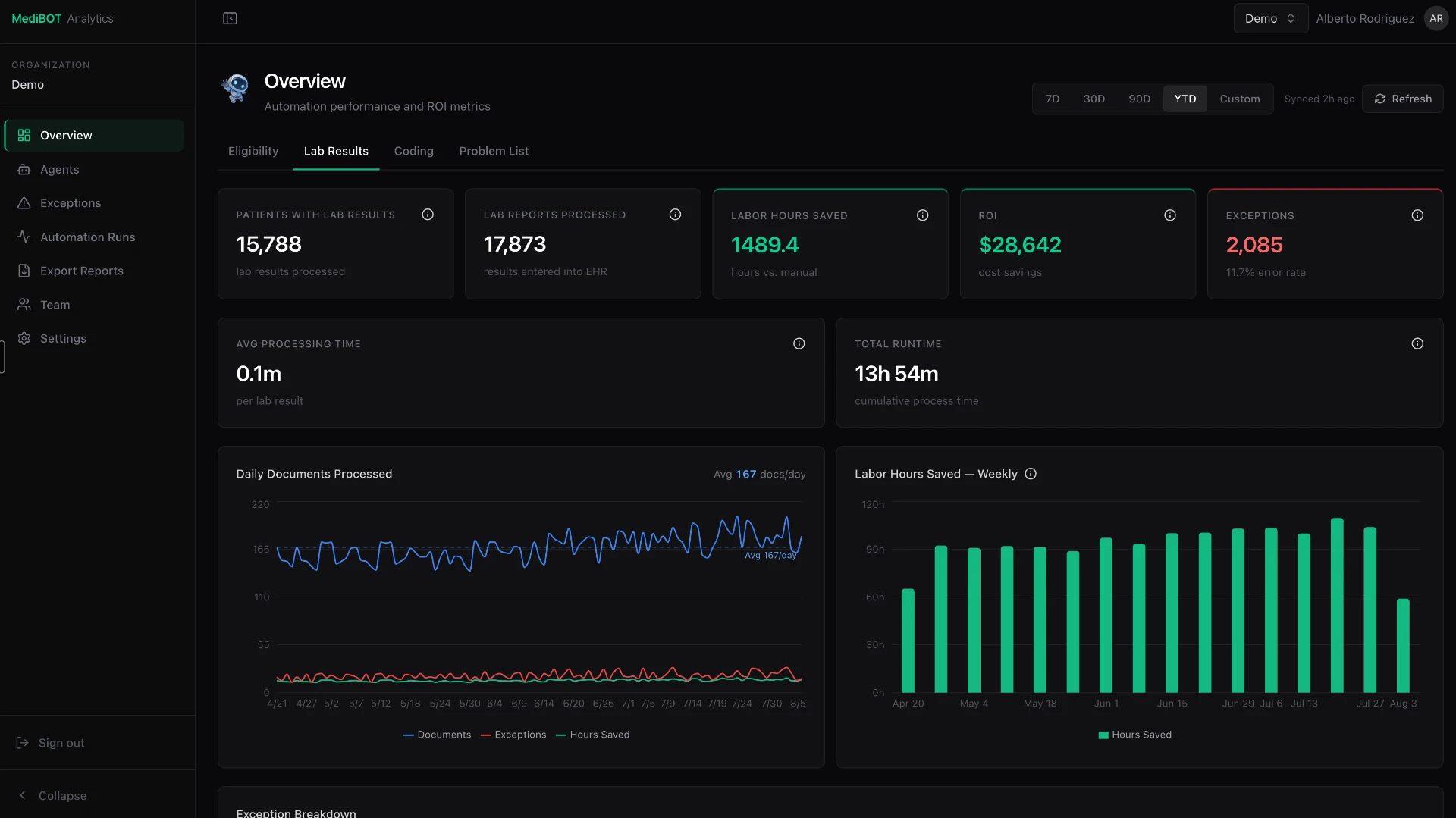
The agent opens new result documents inside eCW, extracts the values, validates them against an accuracy rule, and enters them into the matching order as structured data. Missing fields are flagged, never guessed.

Runs nightly

Problem list cleanup

The agent opens each appointment, locates the patient by account number, applies the approved code and status mapping, and saves the record. One traceable queue item at a time.

Eligibility verification. The agent opens payer portals and writes results back to the chart.
Lab, DI and procedure results. The agent enters structured data directly. Patient data deliberately obscured.
Problem list cleanup. The agent updates records inside the EHR. Patient data deliberately obscured.
Where this is running today

Two health systems.
Island and mainland.

Puerto Rico

Corporación SANOS

Automations in production since January 2025, running against eClinicalWorks and five payer portals. Agent capability in pilot.

San Antonio, Texas

CommuniCare Health Centers

Analytics modernization delivered. Agent deployment in pilot, inside their own AWS environment.

13
Dashboards migrated
49
Power BI reports rebuilt
Matched
Legacy vs new reconciled
Daily
Inference cost tracked
Here is the legacy number, here is ours. They match. That is how you know the migration is trustworthy.CommuniCare data team, executive briefing to their CEO, July 2026
MediBOT Agents is in pilot. We would rather tell you that than demo something that only works on a slide.
The architecture, in plain English

A highly secure
corporate office.

1

The Executive

You ask for a monthly clinical report. It does no heavy lifting. It breaks the request into a plan: fetch the data, format the report, publish it.

2

The Manager

Takes the plan and knows exactly which digital employees are clocked in right now. Assigns each task to the right one.

3

The Employees

Specialists. A data analyst. A report writer. A pipeline engineer. Each does real work and knows only its own domain.

4

The Security Guards

Employees never touch the database. They ask a gatekeeper that fetches exactly what was requested. Even a confused AI cannot run a destructive command or take data it was not given.

The agents generate the report definition. The API decides who is allowed to see the results. Security lives in the data layer, never in the model.
Your data stays in your walls

Not a marketing line.
An architecture.

Your AWS accountEvery deployment runs inside your own tenant. Your BAA with AWS. Your KMS keys. Your VPC. Your audit logs. We build it and we manage it.
Your data never trains a shared modelModel isolation is guaranteed at the platform level. Prompts, documents and outputs are not used to improve anyone's foundation model.
Credentials never sit in an agentThe resource servers hold the credential. A compromised or hallucinating agent cannot reach your database on its own.
Read only, by designThe warehouse connector is SELECT only with no schema rights. On premise databases are read from a replica, never a primary.
Row level security in the APIBilling sees billing. Clinical sees clinical. Enforced when the report runs, by the API, never by the language model.
Every call loggedEach tool call and each report access written with the requesting identity through Teams SSO. Your HIPAA access trail, on demand.
Changes are proposed, not appliedThe agent that touches infrastructure drafts the change. A person approves before anything runs. Least privilege is not enough when the privilege is deploy.
Two paths

Rent your intelligence forever,
or build it once.

Rented intelligence

SaaS dashboards and EHR vendor reports
  • Per seat pricing forever, every new hire another line on an invoice
  • Rigid dashboards designed for someone else's questions
  • Need a new view, file a ticket, wait weeks
  • Your PHI in a third party tenant you do not control
  • Billing, clinical and executive teams forced into the same view

Owned intelligence

MediBOT Agents inside your own AWS
  • No per seat licensing, build and managed operation priced per engagement
  • Views on demand in plain English, iterate live, no ticket
  • Every team defines its own formats and saved views
  • Runs in your AWS account, PHI never leaves your walls
  • Scheduled reports, drafted communications, denial alerts, exception handling
Real prompts your staff can type today

Any question,
any time, on demand.

Every department, every leader, one interface. Nothing to file, nobody to wait on. Ask in Microsoft Teams, get the answer from your own data.

Billing and revenue cycle

Show top 10 denial reasons last month by payer, with dollars at risk.

  • Which CPT codes are denying most often for Medicaid MCO this quarter?
  • Flag claims aging over 60 days by payer and assigned biller.
  • Compare clean claim rate week over week and email me Mondays at 7 a.m.
  • Draft an appeal letter template for medical necessity denials on E/M codes.
Clinical & quality (UDS)

List diabetic patients with A1c over 9 in the last 12 months, by provider panel.

  • UDS Table 6B controlled hypertension vs last year.
  • Patients overdue for colorectal screening with an upcoming visit.
  • Care gap worklist for my Wednesday panel, sorted by risk.
Front desk & patient access

Brief me on today's schedule: insurance flags, missing forms, new patients.

  • Patients with expired Medicaid eligibility coming in this week.
  • Draft a bilingual no-show outreach text for tomorrow's high-risk slots.
  • No-show rate by provider, day of week, and clinic site — last 90 days.
Executive & operations

Should we hire another physician or an NP next quarter? Pull panel size, productivity, and payer mix.

  • Build a board-ready financial and operational summary for last month.
  • Compare visits, encounters, and revenue per provider, site by site, year to date.
  • Alert me when any KPI moves more than 15% week over week.
Operations of the automations

What failed in last night's eligibility run, and what do they have in common?

  • Which payer portal is generating the most exceptions this month?
  • Propose a mapping update for the insurance names that failed to route.
  • Which manual work are we repeating often enough to automate next?
Answering in Teams
Compliance & HR

Which providers have credentials or DEA licenses expiring in the next 90 days?

  • HIPAA access log summary for any record opened by 5+ users.
  • Draft the narrative section of our HRSA OSV readiness checklist.
  • Summarize last week's incident reports, tagged by severity.
No dashboards to build. No tickets to file. Answers land in the same Teams thread you already live in.
Ninety days, three phases

One dedicated team.

One real workflow proven end to end before anything scales.

1
Days 1–30

Foundation

Your AWS environment and model access. Security, IAM and HIPAA controls. eClinicalWorks data model mapped. Staff access through Teams.

2
Days 31–60

Intelligence

Retrieval pipeline built. EHR and claims data ingested. Policies and SOPs loaded. Department use cases configured. Accuracy tested with your own team, on your own numbers.

3
Days 61–90

Go live

Training across every department. Reporting and automation enabled. Documentation handed over. Thirty days of monitoring after launch.

Pricing

Three packages.
No per seat licensing.

Package A

Beginner

$7,500
per month
5FIN agents
4OPS agents
3PRODUCTIVITY agents
  • Secure webchat
  • HIPAA-ready tenant
Package B

Advanced

$12,000
per month
10FIN agents
8OPS agents
6PRODUCTIVITY agents
  • Everything in Beginner
  • Higher transaction volume
Package C

Platinum

$20,000+
TBD, scoped per engagement
14+FIN agents
12+OPS agents
9+PRODUCTIVITY agents
  • MCP servers
  • AI agents and automation
  • Build plus managed operation
Final pricing depends on user count, data volume and EHR complexity.
Two ways in

Buy it, or
build it with us.

For health centers

Start with one workflow.

We pick the workflow with the clearest return, prove it end to end in your environment, and expand from something that already works. Thirty minutes, and we come prepared.

For technology partners

The mainland market is open.

We bring community health center domain depth, eClinicalWorks expertise, a product in production and named references island and mainland. You bring reach, scale or cloud depth. Deployments run in the customer's own AWS account, so the consumption lands where you can co sell it.